 Koru
Koru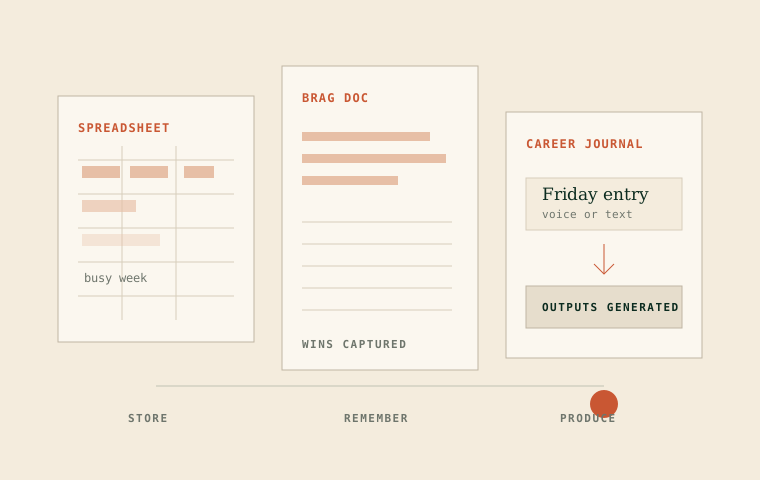
Career journal vs brag doc vs spreadsheet: what actually works
Three approaches to tracking career achievements, compared honestly. Spreadsheets are free and flexible. Brag docs are low-friction. Career journals generate outputs. Here's how to pick based on your actual behavior.
If you've decided to start tracking your career achievements, the next question is how. There are three common approaches, and each one works for certain people. The goal here isn't to rank them. It's to help you pick based on how you actually work, not how you wish you worked.
How you choose in January
"I'll use the most flexible format. I can customize it later."
What matters by Friday
"Will I reopen this, add one useful detail, and get something usable out of it later?"
The spreadsheet
The most common starting point. Open Google Sheets, create columns for date, project, achievement, and impact. Start logging.
What works. Zero setup cost. Totally customizable. No new tool to learn. You own the data completely, it exports to anything, and it works offline. For someone disciplined enough to maintain it, a spreadsheet is genuinely fine.
Where it breaks. Without structure enforcement, the spreadsheet degrades. You skip the "impact" column because you're rushing that Friday and eventually every row is just "worked on X." Searching for "that stakeholder situation from Q2" means scrolling through 200 rows. And when you need a resume bullet or interview story, you're copy-pasting and rewriting manually.
The biggest issue: spreadsheets don't remind you to use them. They sit in a tab you closed three weeks ago.
January
Clean rows. Impact noted. Tags applied.
February
Impact skipped twice. Tags fade out.
March
Three entries. One is unusable.
April
Abandoned. Start fresh next quarter.
Best for: People who already maintain spreadsheets for other things and have the discipline to keep one more updated. If you track your finances in a spreadsheet and actually stick with it, this might work for you too.
The brag document
A running document, Google Doc, Notion page, or plain text file, where you dump wins as they happen. Less structured than a spreadsheet, more narrative.
Where it breaks. Brag docs tend to only capture wins. Challenges you navigated, decisions you made under uncertainty, feedback that changed your approach -- these fall outside the "brag" frame, so they don't get written down. But they're often the most interesting material for interviews.
The document also gets long and unsearchable fast. After six months you have a wall of text with no tagging or categorization unless you impose it yourself. And the same discipline problem applies: without a built-in trigger, you stop updating it around week three.
What brag docs capture
Wins. Shipped features. Positive feedback. Metrics that went up. The highlight reel.
What brag docs miss
Hard decisions. Tradeoffs you navigated. Feedback that stung but changed you. Projects that failed and what you learned. The full picture.
Best for: People who think in narrative rather than data, and who primarily need material for performance reviews (not interviews or CVs).
The career journal (with a purpose-built tool)
Regular short captures -- voice or text -- that get structured automatically. Achievements extracted, skills tagged, patterns identified, outputs generated (STAR stories, CV bullets, interview prep).
What works. Lowest ongoing friction once set up. Two minutes per entry, no formatting decisions. Retrieval is instant -- search by theme, skill, or time period instead of scrolling. An output layer exists: you don't just track achievements, you generate documents from them. And pattern recognition surfaces things you'd never notice on your own, like the fact that your highest-impact work always involves cross-functional coordination.
Where it breaks. Requires adopting a new tool, which means switching cost and a learning curve. The AI structuring is only as good as your input -- vague captures produce vague outputs. It costs money, unlike a free spreadsheet or doc. And you need a few weeks of entries before the pattern recognition has enough data to add real value.
The comparison
Here's the full picture, side by side. The question is not which format looks best when empty. It is which one still works when you need to turn memory into an output.
Spreadsheet
Best when you already live in rows and can maintain your own structure.
- Setup: low
- Search: basic
- Outputs: manual
Brag doc
Best when you think narratively and mainly need performance-review material.
- Setup: very low
- Search: weak
- Outputs: manual
Career journal
Best when you need the record to become interview stories, CV bullets, and promotion cases.
- Setup: medium
- Search: by theme, skill, time
- Outputs: generated
The honest recommendation
If you've been using a spreadsheet and it's working, keep using it. Don't fix what isn't broken.
If you've tried a spreadsheet or brag doc and abandoned it -- and if you're being honest, most people have -- the friction was too high. Not because you're lazy, but because a blank spreadsheet or document requires decisions (what to write, how to structure it, how much detail) that a two-minute habit can't afford.
And if you're not sure which camp you're in, ask yourself one question: have you tried tracking your achievements before? If yes, what happened? The answer tells you more about what tool you need than any comparison table.
Whichever you pick, start this Friday. The approach matters less than the habit.
Related reading
Comparison
Notion Career Journal Template vs Koru
Compare a Notion career journal template with Koru for career tracking, brag documents, STAR stories, and interview preparation.
Comparison
Koru vs Spreadsheets for Career Tracking
Compare Koru with Google Sheets and Excel for tracking career achievements. Learn why free spreadsheets often fail for career journaling and what makes purpose-built tools stick.
Career Development
Best Career Journal Apps in 2026
Compare the top career journaling apps for tracking achievements, preparing for interviews, and building your professional narrative. Tested and reviewed by career development experts.
Professional Development
Best Achievement Tracking Tools in 2026
Compare the best tools for tracking work accomplishments, building brag documents, and preparing for performance reviews. Reviews include AI-powered trackers and traditional methods.